

Scaling with Shopify Plus:
5 tips you need to know
Shopify Plus is designed to help eCommerce businesses scale effectively. By providing enhanced features and support, Shopify Plus allows companies to focus on growth while leaving the technical aspects to the experts. This not only saves time and energy but can also help increase sales and conversions.
To get the most out of Shopify Plus, it’s important to have a clear strategy in place for scaling your business. Check out these five tips to get you started.

Scaling with Shopify Plus: 5 tips you need to know
If your eCommerce business is growing at an incredible rate, then you might be thinking about upgrading to a Shopify Plus store. After all, while Shopify’s standard solution is excellent for basic businesses, enterprise-level companies often need a little extra support to manage their operations while persistently generating growth.
Shopify Plus is currently growing at an impressive rate in the eCommerce market, with around 25,936 stores already using the service. It’s little wonder so many companies are transitioning to this powerful platform, when you consider the wide range of benefits on offer. Not only is Shopify Plus faster and more flexible than the standard Shopify system, but it gives merchants access to exceptional premium support and advanced customizations too.
Of course, before you dive into your transition, it’s worth making sure you have a strategy for how to scale your business, sales, and website effectively.

Is it Time to Upgrade to Shopify Plus?
Shopify Plus has a host of unique benefits, from access to more advanced applications, to powerful API connections and more. However, it’s not right for every business. With a price tag of over $2000 per month, only the biggest businesses are likely to benefit from Shopify Plus. Here are some signs you might be ready to start scaling:
You’re earning serious revenue:
Most Shopify Plus merchants only upgrade their store when they hit seven figures. It’s worth crunching the numbers of how much revenue you’re earning before you splash out for this big monthly subscription.
You need to automate:
If you find yourself spending a lot of time on back-end tasks like inventory management or fraud prevention, Shopify Plus and the “Shopify Flow” solution will save you a lot of valuable time with convenient custom workflows.
You’re expanding internationally:
Shopify Plus is great for businesses expanding internationally. You can use the platform to create up to 9 different stores under one account, and accept various different payment options.
You want to boost customer conversions:
Shopify Plus gives businesses more options to create seamless checkout experiences for customers. You can create customized checkout environments, and add a range of payment options outside of Shopify Payments.
Your traffic is spiking:
Shopify Plus servers allow you to run your ecommerce website with no bandwidth limitations. This is ideal for enterprise online stores with large peaks in traffic. Your theme and apps will continue to run well, no matter what.
You need more support:
While Shopify offers great support on smaller store planners, you get even more ecommerce guidance with a Plus store. Each user gets a dedicated customer success manager, and a launch engineer to work with.
You have a growing team:
If your commerce team is growing, Shopify Plus allows you to support an unlimited number of staff accounts. This means you can add as many professionals to your eCommerce workforce and sales staff as you like.
Tips for Scaling Successfully with Shopify Plus
Once you’ve determined you need to upgrade your store with Shopify Plus, the next step is making sure you’re ready to scale. While there are a number of things you can do once you have the full flexibility and freedom of a Shopify Plus account, some steps are particularly helpful to set your business up for success. Here are our top 5 tips to help you launch your updated enterprise store.

Source: www.shopify.com
1. Educate Yourself
While users on the Shopify Plus platform get a lot of extra customer support when dealing with things like integrations, new features, and software automation, it’s still helpful to do a little research. Shopify’s customer service team can work with you to create webinars and educational resources to share with your sales and marketing teams before you get started.
You can also sign your team up for the Shopify Plus Academy. This useful eLearning resource can give you step-by-step guidance on everything from choosing the right payment methods, to managing your inventory and finding effective Shopify partners. There are more than 100 self-guided courses to explore at your own pace, so you can consistently learn and grow.
It’s also worth signing up for the Shopify Plus newsletter, as this will keep you and other admin members up-to-date on the changing features in the ecosystem. You’ll be able to stay ahead of new apps, shipping options, integrations, and tools.

2. Upgrade Your Checkout
One of the best things about Shopify Plus, is how much freedom you have to create a customizable, high-performance checkout. You can use Shopify scripts to customize everything from customer fields, payment methods, and shipping methods automatically. There’s also the option to personalize your checkout experience based on the value of your customer’s carts.
There are also various templates available to get you started, so you don’t necessarily need to be a coding expert to start making changes. Your Shopify Plus support team will help you with implementing tools and strategies which reduce your customer acquisition costs, and increase your revenue. Aside from Shopify scripts, don’t forget to check out the available apps and integrations you can use to strengthen the customer checkout experience too.
You can use tools like Dialogue as a Shopify Plus merchant to embed personalized recommendations directly into the checkout page. This is a fantastic way to showcase more of your inventory to customers, increase your selling opportunities, and boost average order value.
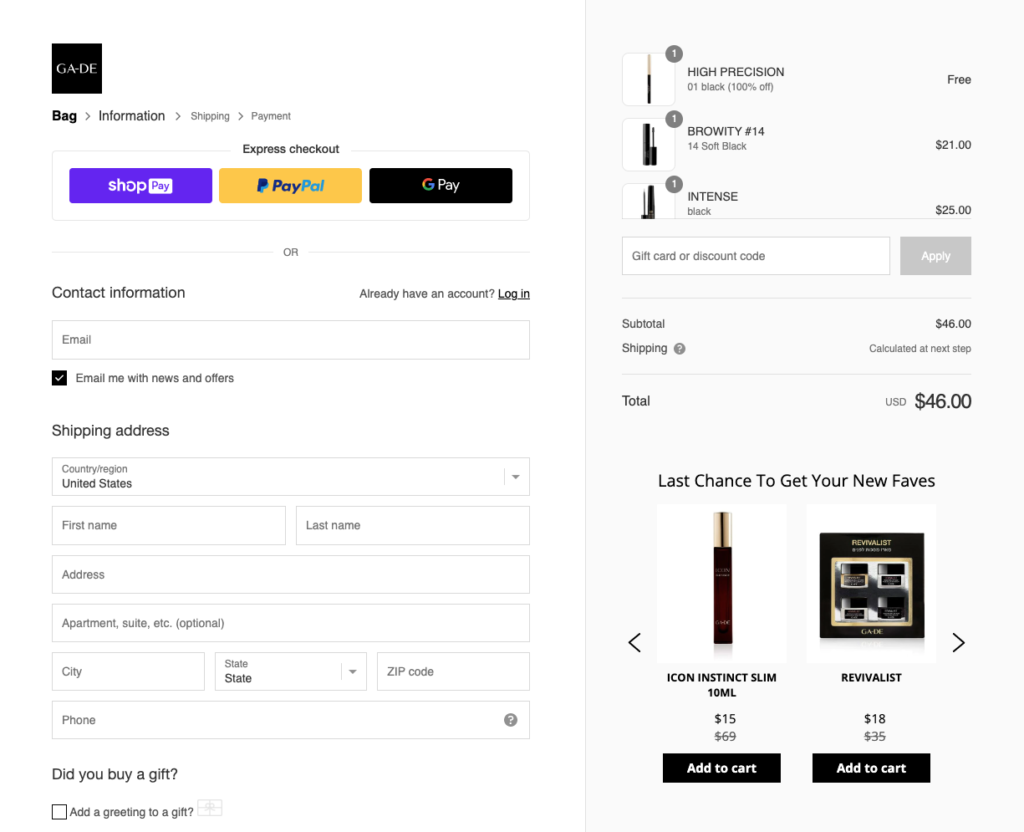
Dialogue’s personalized recommendations on GA-DE’s checkout page
3. Take Advantage of Automation
You probably already use automation tools for things like marketing and inventory management, so why not take advantage of similar solutions for your Shopify store? The Shopify Plus plan comes with convenient access to the Shopify Flow environment, where you can create your own custom automation workflows for unlimited use cases.
Shopify Flow allows you to automate nurture campaigns for pre-order purchases, create support tickets when you receive a negative review, and personalise marketing by tagging customers based on their purchasing behavior. You can use the tools to organize customers by their life-time spend teers, and set up notifications when products are low in stock.
Outside of Shopify Flow, the Shopify Plus plan also offers access to the “Launchpad” system. This will allow you to create powerful sales campaigns and product launches in a matter of minutes. There are also automatic reports available which you can use to help guide future strategies.
4. Expand Your Sales Potential
As your company continues to grow, it’s worth looking for ways to keep expanding and growing your potential audience. There are various ways to do this with Shopify Plus. For instance, you can integrate your existing store with other sales channels like eBay, Etsy, and Pinterest, so you can connect with your customer wherever they are.
If you want to sell to customers in a range of additional countries, you could also consider creating separate Shopify stores for different global audiences. The Shopify Plus admin environment gives you unlimited potential to manage various different stores within the same interface. You can manage users, create new stores, and track crucial business KPIs across your organization.
Since you have the option to add unlimited admin accounts to your Shopify Plus plan, you’ll be able to assign different team members to different store or website options, so you can ensure you’re delivering excellent experiences on every channel. Notably, Shopify organizational admins can also perform various actions across multiple stores at the same time. So, if you want to make some major changes to the way you process payments on every store, you don’t have edit each site individually.
5. Double down on Great Customer Service
Finally, while growing your Shopify store is great, it’s important to make sure you don’t allow your growth to disrupt your focus on customer service. Ultimately, the only way you’re going to keep selling is if you maintain your focus on generating amazing experiences for your audience. Personalizing your checkout with specific recommendations for each customer is a good way to begin, but you can also try things like:
- Building a customer self-service help center: Take some of the work away from your customer service agents by creating an FAQ page or installing a chatbot into your store. This will help customers to solve more issues without extra help.
Collect feedback: Track and process customer feedback with an application for your Shopify store. This is a great way to keep your finger on the pulse of your customer’s experiences, while also ensuring you have access to plenty of social proof and testimonials.
Enhance your store experience: Make sure every part of your Shopify store works perfectly. This should be easy with the unlimited bandwidth that Shopify Plus offers, but it’s still a good idea for merchants to keep an eye on user experience and loading times.
Ready to Scale with Shopify Plus?
If your business is achieving phenomenal sales, the extra cost of upgrading to the Shopify Plus platform could be well-worth it in the long term. Shopify Plus helps enterprise businesses to expand the features of their store, and connect with a wider range of customers online. You can upgrade your apps, customize your store more than ever, and even expand on a global level.
Just remember, before you dive into your Shopify Plus scaling journey, it’s worth making sure you’re ready for the transition. Use the tips above to boost your chances of a consistently successful online store experience.
Sign up for our Newsletter
Recent Posts


